SharePoint Lookup Column and its limits
 SharePoint comes with a very nice feature, the possibility to create columns (for lists, libraries metadata) based on lookup on other lists.
While this is very nice, it come with a huge limitation, you can only lookup list on the site where you are creating the column. If it is a site column, you will still be able to use it in subsites but that’s it.
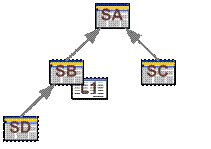
If for example you have the following sites/subsites
SharePoint comes with a very nice feature, the possibility to create columns (for lists, libraries metadata) based on lookup on other lists.
While this is very nice, it come with a huge limitation, you can only lookup list on the site where you are creating the column. If it is a site column, you will still be able to use it in subsites but that’s it.
If for example you have the following sites/subsites
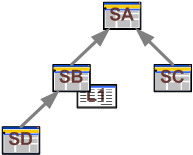 Where SA, SB, SC, SD are SharePoint Sites (SPWebs) and SB includes a List L1.
There is no Out Of The Box (OOTB) means to create a lookup in SC on L1. In case of need you will still be able to use some cross site solutions available here and there (e.g. : http://tonybierman.blogspot.com/2008/07/free-custom-cross-site-lookup-column.html).
That’s usually where my conclusion would take place, maybe with a bit of ranting against Microsoft for not allowing us to do that in a standard WSS collection. This conclusion might even have ended with a new item being added to my “What I want in Microsoft SharePoint Server 2010?” wish list.
But it isn’t because I stumbled upon an interesting fact: there actually is a way to do that OOTB.
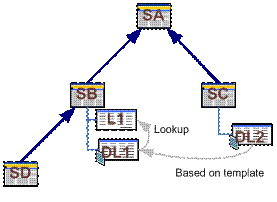
So first create a Site Column in SB, this column shall be a lookup on a L1 field. Now Create a document library in SB, let’s call it DL1. Use the site column you just created in SB.
You can now save DL1 as a library template and finally create a new document library DL2 in SC based on this template.
You get something like that:
Where SA, SB, SC, SD are SharePoint Sites (SPWebs) and SB includes a List L1.
There is no Out Of The Box (OOTB) means to create a lookup in SC on L1. In case of need you will still be able to use some cross site solutions available here and there (e.g. : http://tonybierman.blogspot.com/2008/07/free-custom-cross-site-lookup-column.html).
That’s usually where my conclusion would take place, maybe with a bit of ranting against Microsoft for not allowing us to do that in a standard WSS collection. This conclusion might even have ended with a new item being added to my “What I want in Microsoft SharePoint Server 2010?” wish list.
But it isn’t because I stumbled upon an interesting fact: there actually is a way to do that OOTB.
So first create a Site Column in SB, this column shall be a lookup on a L1 field. Now Create a document library in SB, let’s call it DL1. Use the site column you just created in SB.
You can now save DL1 as a library template and finally create a new document library DL2 in SC based on this template.
You get something like that:
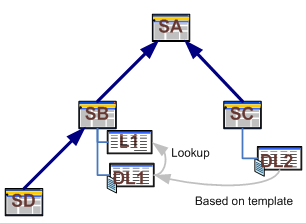 If you add a document to DL2, you will be able to select a property based on a L1 lookup. If you still can’t believe it, try adding an item to L1 just to make sure it is available in the list of choice in DL2.
I don’t think it is usable in real life but it triggered something in me. It is clearly possible to lookup a field from another list using only standard features. I then decided to give it a try using CAML to create my lookup field and guess what it works very well. I will give you more details very soon!
Edit: More Details in a newer post.
Photo : Lookup Pop credit Tomas @Flickr
If you add a document to DL2, you will be able to select a property based on a L1 lookup. If you still can’t believe it, try adding an item to L1 just to make sure it is available in the list of choice in DL2.
I don’t think it is usable in real life but it triggered something in me. It is clearly possible to lookup a field from another list using only standard features. I then decided to give it a try using CAML to create my lookup field and guess what it works very well. I will give you more details very soon!
Edit: More Details in a newer post.
Photo : Lookup Pop credit Tomas @Flickr